
Guides
Create a 2D companion
For Live2D artists. Put your rigged character on screen in a few minutes, then share her with other people. No code needed.
A 2D companion is a Live2D Cubism model. If you can rig and animate in Cubism Editor, you have what you need. You don't need to code or use a terminal.
You need a rigged Live2D model. A flat PNG won't work, because rigging is what makes it move. If you don't rig, you can commission a Live2D rigger, or make a 3D companion with VRoid Studio instead.
There are two routes:
- Just for you: upload your model and talk to her.
- Share her with other people: add your model to our starter folder and upload it as a plugin. Anyone can install her once you list it.
Start with route 1, even if you plan to share. It's the quickest way to see how your model behaves.
Get your model ready
Export for runtime from Cubism Editor, then export your motions as .motion3.json files. Put everything in one folder, with the motions in a folder called motions:
Aiko/
  Aiko.model3.json
  Aiko.moc3
  Aiko.physics3.json
  Aiko.cdi3.json
  Aiko.2048/texture_00.png
  motions/idle.motion3.json
  motions/talk.motion3.json
  motions/nod.motion3.json
Unlike 3D, a 2D model has no ready-made motions to borrow, so you animate your own. You need at least an idle to upload it for yourself. To share it, you need three: an idle, a talking loop and one gesture.
Then zip the folder: right-click it and choose Compress (Mac) or Compress to ZIP (Windows). The zip can be up to 100 MB.
Use the standard parameter names
We move your model by setting standard Cubism parameters. If you started from Cubism's standard parameter set, this already works.
| Parameter | What it gives her | Without it |
|---|---|---|
ParamAngleX, ParamAngleY, ParamAngleZ |
She turns and nods, and the background shifts slightly as she moves | Her head only moves in your own motions |
ParamEyeBallX, ParamEyeBallY |
Her eyes look at the person | Her eyes stay still |
ParamEyeLOpen, ParamEyeROpen |
She blinks | She doesn't blink |
ParamMouthOpenY, ParamMouthForm |
Her mouth moves with her voice | Her mouth stays still |
ParamBodyAngleX, ParamBodyAngleZ |
Her body turns and sways | Only a slight sway of the whole figure |
ParamBreath |
Her chest moves as she breathes | No breathing from us |
| A physics file | Hair and clothes follow her movement | They stay rigid |
Using your own names for her face? You can map them.
Two more things worth doing:
- Add a hit area with "Head" or "Face" in its name. It tells us exactly where her head is, for the Face view and for clicks. Without one, we measure it from what moves when
ParamAngleXturns. - Watch texture size. A model must fit in 448 MB and four 4096-pixel textures on a desktop, and 192 MB and two textures on a phone.
Route 1: Just for you
Open Companions in the console and choose to create your own.
Under How it looks, choose Upload your own and pick your
.zip.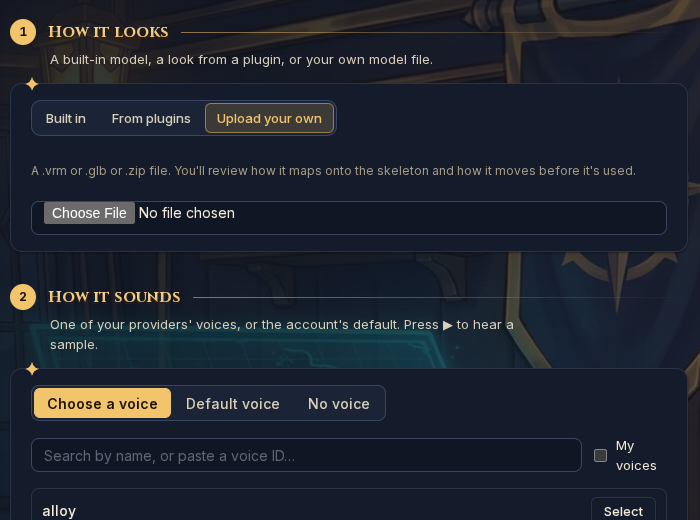
She appears in a small preview. Under Add from this model, tick your motions.
Each ticked motion starts as a Gesture. Set what each one is for by ticking Idle, While talking and so on, and unticking Gestures. She needs at least one Idle.
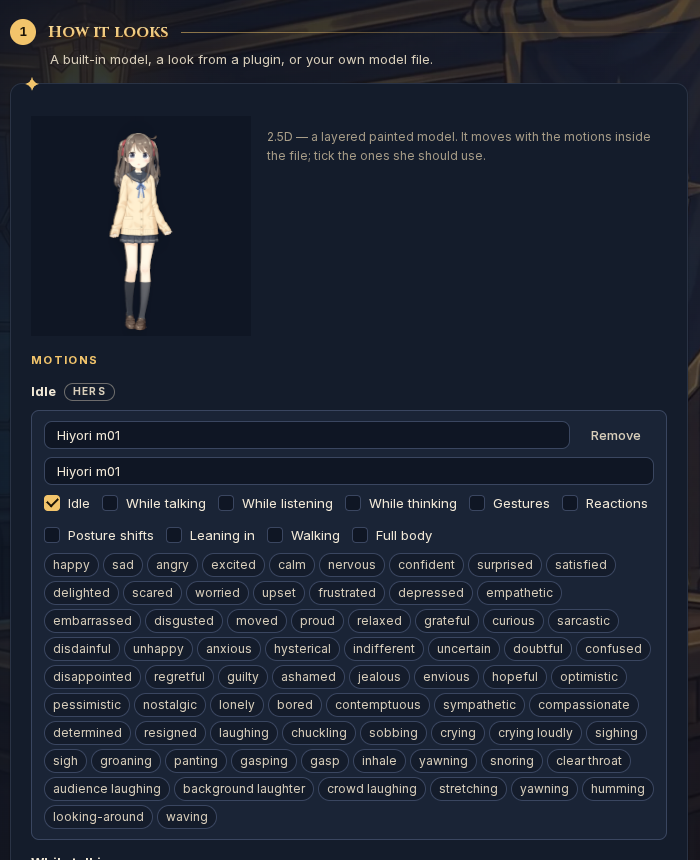
Replace each motion's second box with a short description of what it does, such as "A small, friendly nod". She reads it to choose a gesture.
Press Use this file.
Choose a voice, and give her a name and personality. You can change these later.
Press Create, and talk to her.
If the Create step says you've reached your plan's agent limit, choose One of your agents under Who it talks as. Your character then becomes the face of an agent you already have.
Route 2: Share her with other people
A plugin is just a folder that we read. Our starter folder has everything set up, so you mostly drop your model in.
Name three motions exactly. In your model's
motionsfolder, name themidle.motion3.json,talk.motion3.jsonandnod.motion3.json. The nod can be any small gesture. Then zip your model folder.Download the 2D starter folder and unzip it.
Copy your model's zip into
companion-models/my-look/and name it exactlymodel.zip.Name your pack. Open
readme.mdin any text editor (Notepad or TextEdit are fine) and changeMy Companion Packto your own name. It must be unique, soAiko by YourNameis a good pattern.Describe her. Open
companion-characters/my-companion/character.jsonand change the text inside the quotes. Leave thelookline alone.Line What it is nameher name in the gallery vibeone short line on her card soulher personality, in plain sentences instructionshow she should talk Keep the quotes and commas as they are. To get a line break, write
\n, and write\"for a quote inside the text.Zip the starter folder, just like your model.
Upload it. In the console, go to Plugins → Created → Upload a plugin and choose your zip.
Try her. Install the plugin, open Companions, find her in the gallery and press Talk.
Share her. On the plugin's page, open the ⋯ menu and choose List in Browse. Until you do, only your account can install her.
To publish a change later, edit the folder and raise version: in readme.md, for example from 1.0 to 1.1. Then zip it and upload it on the plugin's page.
Make her your own
These are all optional. You can ask an AI assistant to make the edit for you. Our docs in plain text give it everything it needs.
| To add | What you do | Read more |
|---|---|---|
| More motions | Add them to model.json, each with what it's for: listening, thinking, a reaction and so on |
Model |
| A picture in the gallery | Add thumbnail.png to my-look, and name it in model.json |
Model |
| A room behind her | Add a soft room picture and name it in model.json. It's blurred and cropped to fit, and she picks up its colours automatically |
Background |
| Exact crops | Say what each Face, Upper body and Full body button shows | Framing |
| A set voice | Suggest a voice from a provider | Character |
2D companions can't have outfits, held items or walking, because the artwork is one painted piece.
Check her before you share her
- Try Face, Upper body and Full body in a narrow window as well as a wide one.
- Play every motion, and watch how each one starts and ends.
- Talk to her and watch her mouth, blinks and eyes.
- Click her head and body, and check she reacts.
If something looks wrong
| What you see | Likely cause | What to do |
|---|---|---|
| Use this file is greyed out | No motion is set to Idle, or a motion has no description | Tick Idle on one motion, and fill in the boxes |
| The Face view is empty or cut off | Her figure doesn't fill the canvas, or sits off to one side | Add a hit area with "Head" in its name, or trim the canvas. You can also set the view in the companion's Frame mode |
| The mouth doesn't move | No ParamMouthOpenY, or no voice is set |
Rename the parameter or map it, and check she has a voice |
| She doesn't blink | No ParamEyeLOpen or ParamEyeROpen |
Rename them or map them |
| Her head doesn't turn | No ParamAngleX |
Rename it, and check it's connected in your rig |
| Hair stays rigid | No physics file, or it isn't named in the .model3.json |
Export physics again |
| A motion moves the wrong things | It was made for another model | Export it again from this model |
When an upload is refused
The message names what's wrong. These are the common ones:
| Message | What it means |
|---|---|
'avatar' names file 'model.zip', which isn't in the package |
Your model's zip isn't in companion-models/my-look/, or isn't named exactly model.zip |
the avatar has no animation named 'motions/idle.motion3.json' |
A motion isn't in your model's zip, or is named differently. Names must match exactly |
a look needs at least one idle, one talkIdle and one gesture motion |
You removed motions she needs |
| A message about JSON or an unexpected character | A quote or comma was removed from a file you edited. Undo your last change, or paste the file into an online JSON checker |
Words you'll see
| Word | Meaning |
|---|---|
| Look | Her model and motions |
| Character | Her card in the gallery: name, personality and suggested voice |
| Plugin or pack | The folder you upload, which can hold several looks and characters |
| Role | What a motion is for, such as idle, talking or a gesture |
| 2.5D | What the reference docs and console call a Live2D model |
The full reference for every setting is Companion packs.